What MT5 order types are there?
MT5 has Market Orders and six main Pending Order types: Buy Limit, Sell Limit, Buy Stop, Sell Stop, Buy Stop Limit, and Sell Stop Limit. A Market Order opens a trade immediately, while a Pending Order opens only if the market reaches a selected price level. MetaTrader 5 order types are trade instructions that tell the MT5 trading platform how and when to open a position.
What Are MT5 Order Types?
An MT5 order type is a trading instruction that tells MetaTrader 5 whether to enter the market now, wait for a pullback, wait for a breakout, or place a second order after a trigger price is reached.
Order types are important because they help traders turn analysis into execution. A trader may want to buy immediately, buy only after price falls to support, or buy only after price breaks resistance. Each scenario requires a different order type.
NordFX is a multi-asset broker that provides access to the MetaTrader 5 trading platform. MT5 is the platform where traders place and manage these order types.
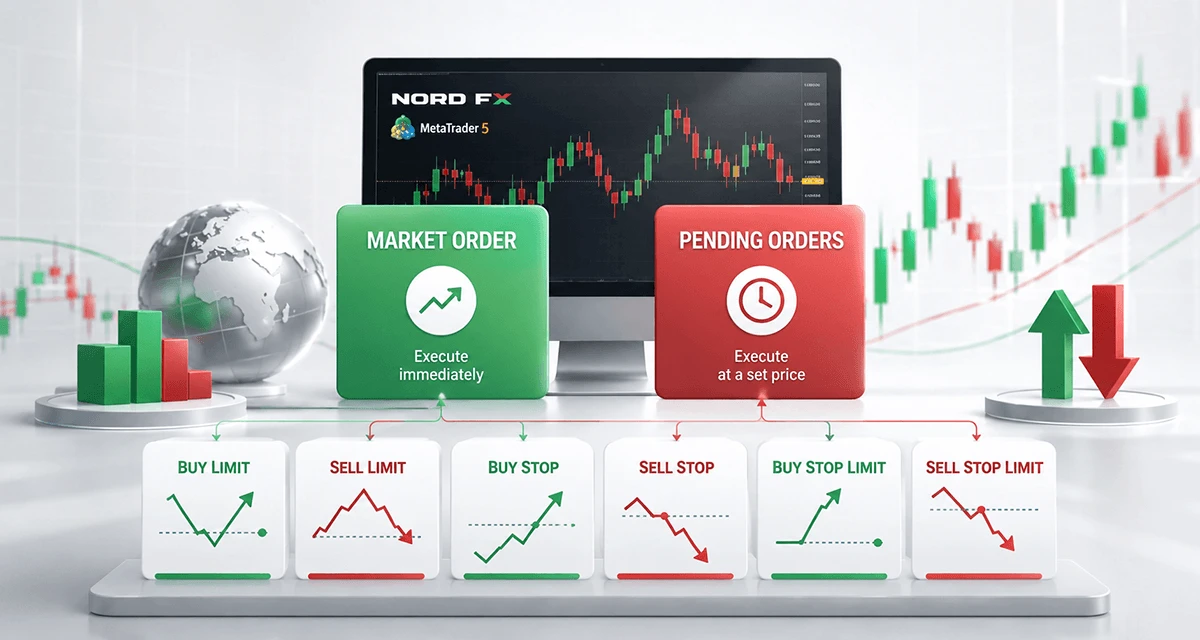
MT5 Order Types at a Glance
MT5 order types can be divided into entry orders and risk-management orders. Entry orders open trades. Risk-management orders help close or manage trades after they are opened.
Category | Order or Tool | Main Function |
Entry order | Market Order | Opens a trade immediately |
Entry order | Buy Limit | Buys below the current price |
Entry order | Sell Limit | Sells above the current price |
Entry order | Buy Stop | Buys above the current price |
Entry order | Sell Stop | Sells below the current price |
Entry order | Buy Stop Limit | Triggers a Buy Limit after price rises to a stop level |
Entry order | Sell Stop Limit | Triggers a Sell Limit after price falls to a stop level |
Risk-management tool | Stop Loss | Helps close a losing trade at a selected level |
Risk-management tool | Take Profit | Helps close a profitable trade at a selected level |
This distinction matters. Market, Limit, Stop, and Stop Limit orders are used to enter trades. Stop Loss and Take Profit are used to manage exits.
What Is a Market Order in MT5?
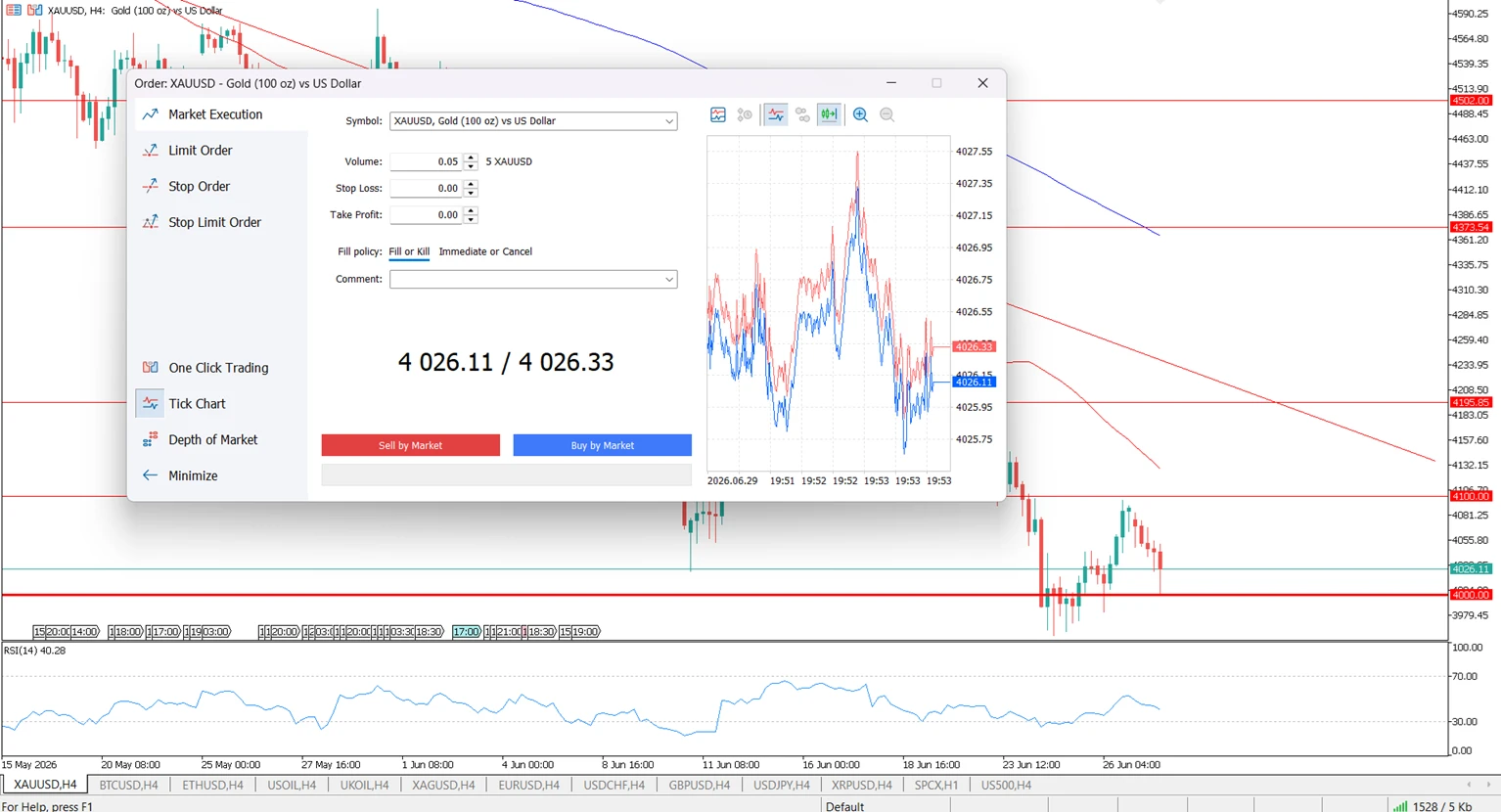
A Market Order is an instruction to open a buy or sell trade immediately at the available market price.
A Market Buy opens a long position. A Market Sell opens a short position. Market Orders are simple, but the final execution price may depend on spread, liquidity, volatility, and execution conditions.
Example:
If XAUUSD is trading near 4,000 and a trader wants to enter immediately, the trader can place a Market Buy order in MT5. The position opens at the available market price, and the trader can add Stop Loss and Take Profit levels to manage risk and target planning.
What Is a Pending Order in MT5?
A Pending Order is an instruction to open a trade later if the market reaches a selected price.
Pending Orders are useful when a trader has a specific entry plan but does not want to watch the chart constantly. They are commonly used around support, resistance, breakouts, pullbacks, and planned technical levels.
There are six main Pending Order types in MT5: Buy Limit, Sell Limit, Buy Stop, Sell Stop, Buy Stop Limit, and Sell Stop Limit.
For a broader trading education overview, see How Trading Works.
What Is the Difference Between Limit and Stop Orders in MT5?
Limit orders are usually used for pullbacks, while Stop orders are usually used for breakouts.
A Limit order waits for price to move to a more favorable level before entering. A Stop order waits for price to move beyond a selected level before entering.
Order Type | Placed Where? | Common Use |
Buy Limit | Below current price | Buy after a pullback |
Sell Limit | Above current price | Sell after a rebound |
Buy Stop | Above current price | Buy after an upside breakout |
Sell Stop | Below current price | Sell after a downside breakout |
Simple rule:
Use Limit Orders when you expect price to return to a level. Use Stop Orders when you expect price to continue after breaking a level.
Buy Limit Order Explained
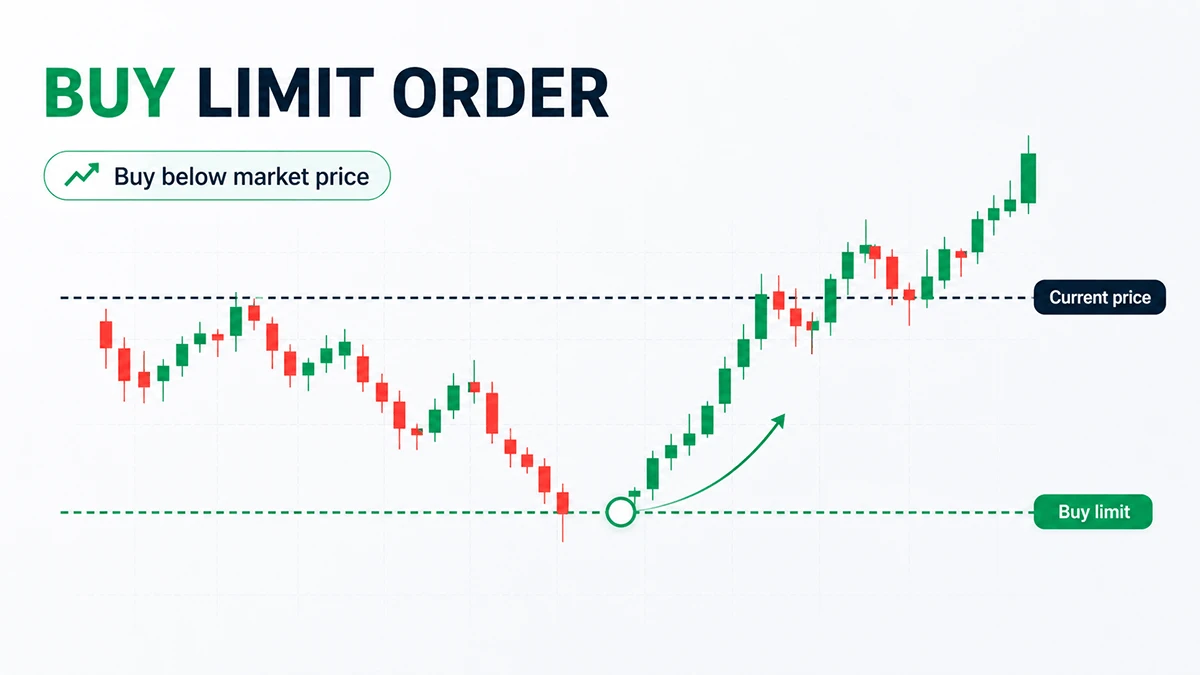
A Buy Limit order is a pending order to buy below the current market price.
Traders use Buy Limit orders when they expect the price to fall first and then rise. This is often linked to support levels, pullback entries, or buying at a lower price than the current market.
Sell Limit Order Explained
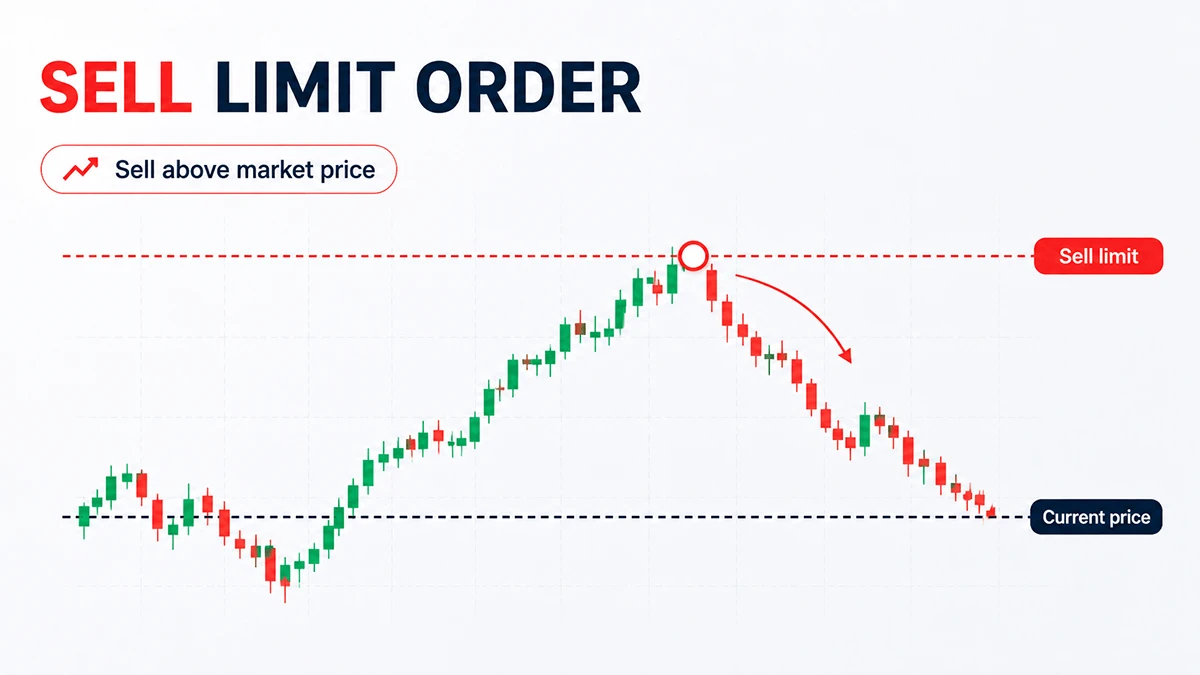
A Sell Limit order is a pending order to sell above the current market price.
Traders use Sell Limit orders when they expect the price to rise first and then fall. This order type is often used near resistance levels or after an upward correction.
Buy Stop Order Explained
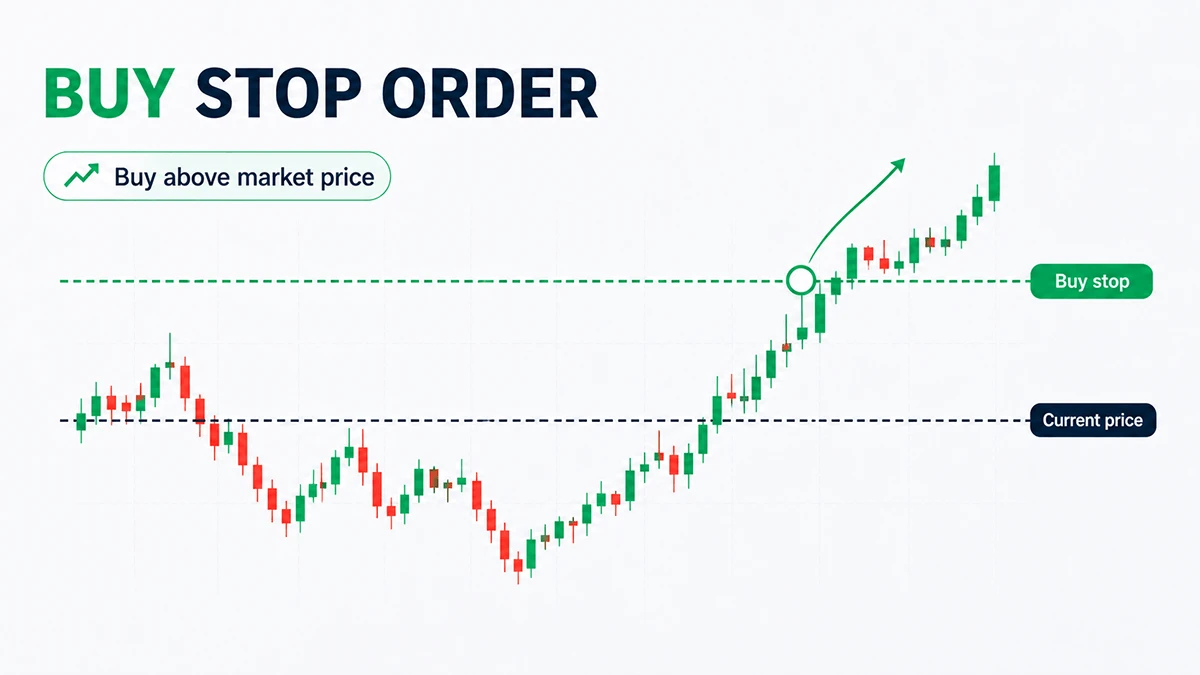
A Buy Stop order is a pending order to buy above the current market price.
Traders use Buy Stop orders when they want to enter only after price breaks above a selected level. This is common in breakout trading.
Sell Stop Order Explained
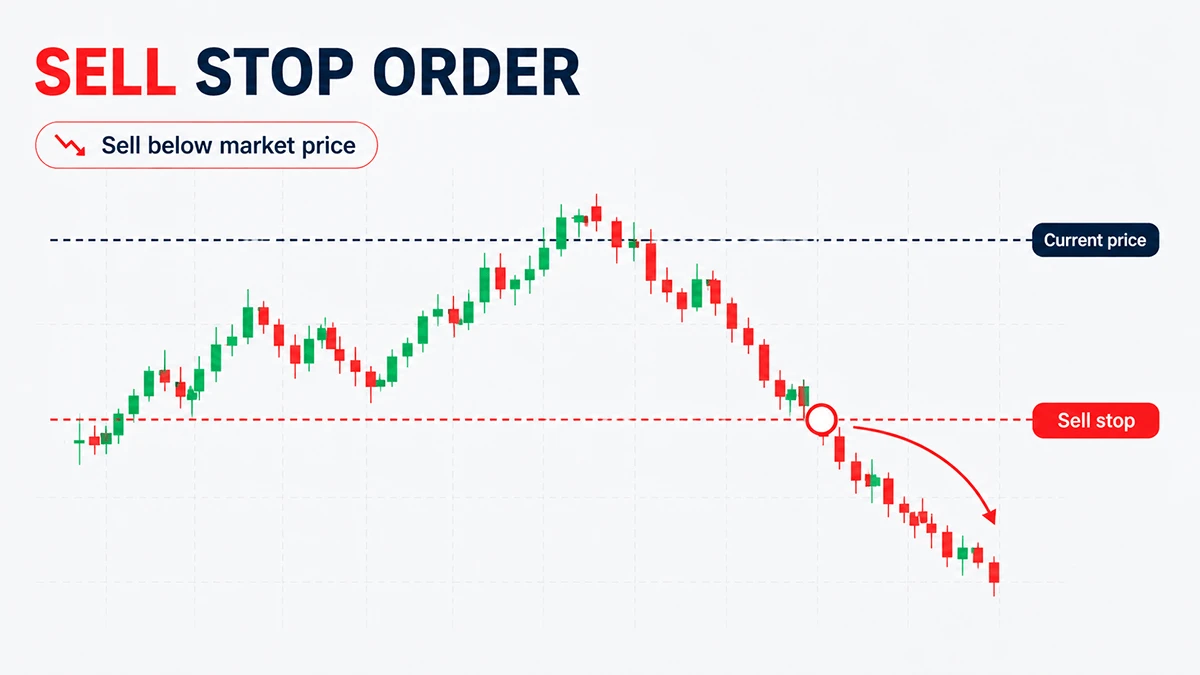
A Sell Stop order is a pending order to sell below the current market price.
Traders use Sell Stop orders when they want to enter only after price breaks below a selected level. This is often used when support breaks and the trader expects further downside movement.
Buy Stop Limit and Sell Stop Limit Explained
Buy Stop Limit and Sell Stop Limit orders are advanced MT5 pending orders that combine a stop trigger with a limit order.
They are not the same as normal Buy Stop or Sell Stop orders. A standard Stop order can open a trade when the trigger level is reached. A Stop Limit order first waits for the trigger, then places a Limit order at another selected price.
Stop Limit Order | Step 1 | Step 2 | Typical Use |
Buy Stop Limit | Price rises to the stop level | MT5 places a Buy Limit order below that stop level | Breakout confirmation followed by a controlled pullback entry |
Sell Stop Limit | Price falls to the stop level | MT5 places a Sell Limit order above that stop level | Breakdown confirmation followed by a controlled rebound entry |
Example:
XAUUSD is trading at 3,380. Resistance is near 3,400. A trader wants confirmation that price can break higher, but does not want to buy too high after the breakout. The trader can use a Buy Stop Limit order: the stop level may be above 3,400, while the Stop Limit price is set lower as the intended Buy Limit level after the breakout trigger.
Stop Limit orders are more complex than standard pending orders. Beginners usually understand Market Orders, Limit Orders, and Stop Orders first before using Stop Limit orders.
How Do You Choose the Right MT5 Order Type?
The right MT5 order type depends on the trader’s entry logic.
Trading Plan | Suitable MT5 Order Type |
Enter immediately | Market Order |
Buy after price falls to support | Buy Limit |
Sell after price rises to resistance | Sell Limit |
Buy after price breaks resistance | Buy Stop |
Sell after price breaks support | Sell Stop |
Buy after breakout confirmation and pullback | Buy Stop Limit |
Sell after breakdown confirmation and rebound | Sell Stop Limit |
A trader should choose the order type after defining the market scenario. The order type should match the trading plan, not the other way around.
For available markets, see trading instruments available in NordFX.
How to Place an Order in MT5
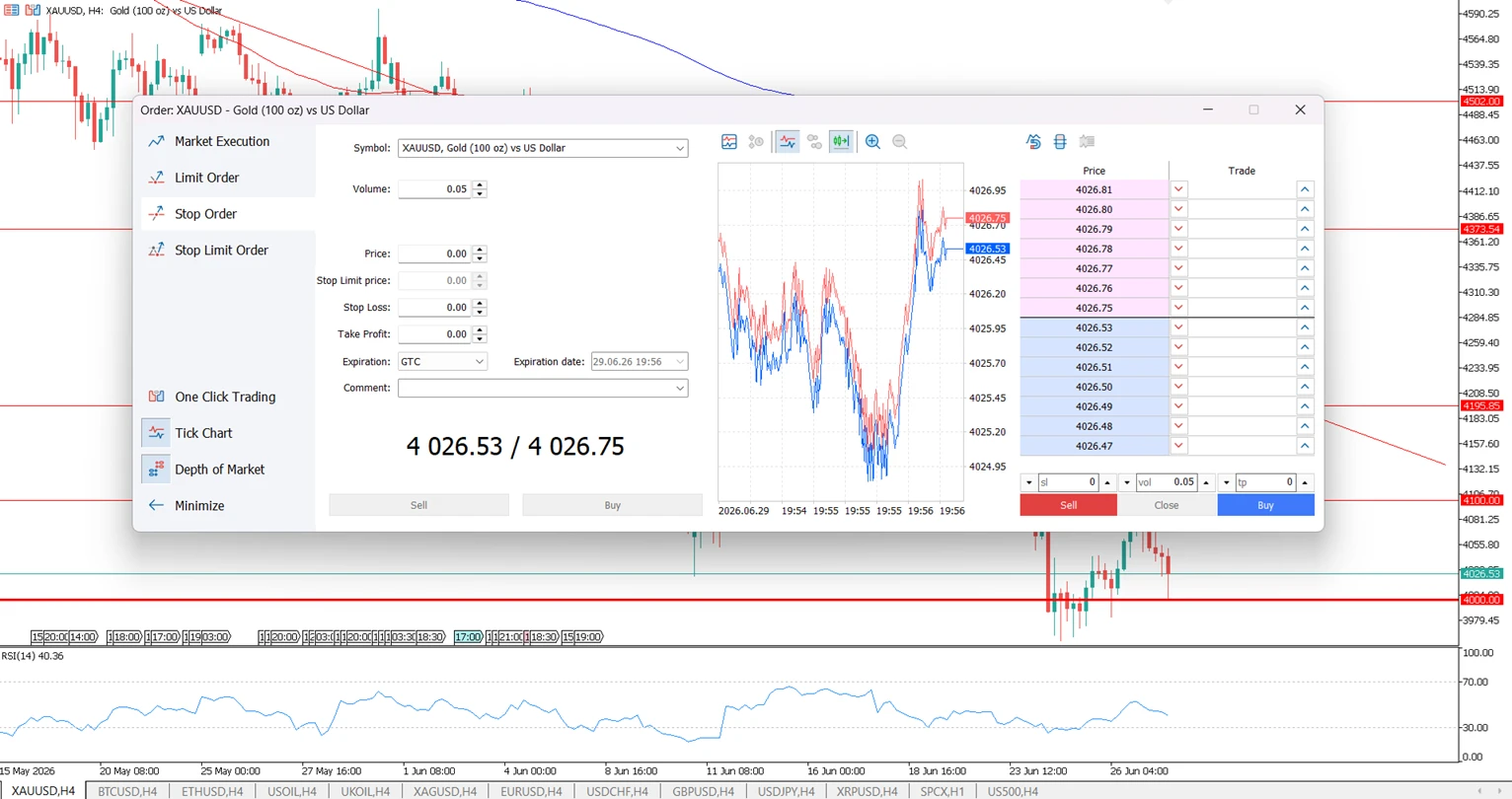
To place an order in MT5, choose the instrument, open the order window, select the order type, enter volume, set price levels if needed, and confirm the order.
Typical steps:
- Open the selected instrument in Market Watch or from the chart.
- Click New Order.
- Choose Market Execution or a Pending Order type.
- Enter the trade volume.
- For a pending order, enter the planned entry price.
- Add Stop Loss and Take Profit if they are part of the plan.
- Review the order details before confirming.
Stop Loss and Take Profit can help structure risk and exit planning, but they do not remove trading risk. Execution may still depend on market conditions, price gaps, liquidity, and volatility.
For definitions of related terms, use the Trading Glossary.
Common Mistakes When Using MT5 Order Types
The most common MT5 order mistakes happen when traders confuse pullback entries, breakout entries, and risk-management tools.
Mistake | Why It Happens | How to Avoid It |
Using Buy Limit instead of Buy Stop | The trader wants to buy a breakout but selects a pullback order | Use Buy Stop when the planned entry is above current price |
Using Sell Limit instead of Sell Stop | The trader wants to sell a breakdown but selects a rebound order | Use Sell Stop when the planned entry is below current price |
Confusing Stop orders with Stop Loss | Both use the word “stop” | Remember: Buy Stop and Sell Stop open trades; Stop Loss helps close trades |
Placing orders too close to price | The trader ignores spread and normal market noise | Leave enough distance for volatility and symbol conditions |
Forgetting order expiration | The pending order remains active longer than intended | Review active orders regularly |
Using Stop Limit orders too early | The trader does not understand the two-step trigger | Learn standard Limit and Stop orders first |
Ignoring risk before entry | The trader focuses only on direction | Define position size, Stop Loss, and invalidation level before placing the order |
Are Stop Loss and Take Profit MT5 Order Types?
Stop Loss and Take Profit are risk-management orders, not entry order types.
A Stop Loss helps close a position if the market moves against the trade. A Take Profit helps close a position if the market reaches a selected target. They can usually be added when placing a new order or modified later in MT5.
FAQ
How many order types are there in MT5?
MT5 has Market Orders and six main Pending Order types: Buy Limit, Sell Limit, Buy Stop, Sell Stop, Buy Stop Limit, and Sell Stop Limit.
What is the simplest MT5 order type?
The simplest MT5 order type is a Market Order because it opens a trade immediately at the available market price.
What is the difference between a Market Order and a Pending Order?
A Market Order opens immediately. A Pending Order opens only if the market reaches a selected price level.
What is the difference between Buy Limit and Buy Stop?
A Buy Limit order is placed below the current price and is used for pullback entries. A Buy Stop order is placed above the current price and is used for breakout entries.
What is the difference between Sell Limit and Sell Stop?
A Sell Limit order is placed above the current price and is used after a price rise. A Sell Stop order is placed below the current price and is used after a price breakdown.
Are Stop Limit orders good for beginners?
Stop Limit orders are usually better for traders who already understand standard Limit and Stop orders. They are more complex because they use both a trigger price and a limit price.
Can pending orders expire in MT5?
Yes. MT5 allows traders to set expiration conditions for pending orders. If the market does not reach the selected level before expiration, the order is removed.
Does every broker offer the same MT5 trading conditions?
No. MT5 is the trading platform, but trading conditions depend on the broker, account type, instrument, spread, liquidity, margin requirements, and execution model.
Key Takeaways
- MT5 order types define how and when trades are opened.
- Market Orders are used for immediate entries.
- Limit Orders are usually used for pullbacks.
- Stop Orders are usually used for breakouts.
- Stop Limit Orders are advanced two-step pending orders.
- Stop Loss and Take Profit are risk-management tools, not standard entry order types.
- The best order type depends on the trader’s plan, price level, and risk-management rules.
Meet the Author
Vanessa Polson is a marketing manager at NordFX with over twelve years of experience in online marketing within the financial services industry. She has developed and executed data-driven campaigns across search, social, and display channels in in-house environments. Her work focuses on translating complex financial products and trading tools into clear, practical educational content, giving her a broad and well-rounded view of the global trading landscape.
Connect with Vanessa on LinkedIn.
Go Back Go Back